Password security has become a crucial issue in an era where cyberattacks are on the rise. This content explains how long it takes to hack a password based on its length and complexity, using data published by Security.org and relayed by Statista .
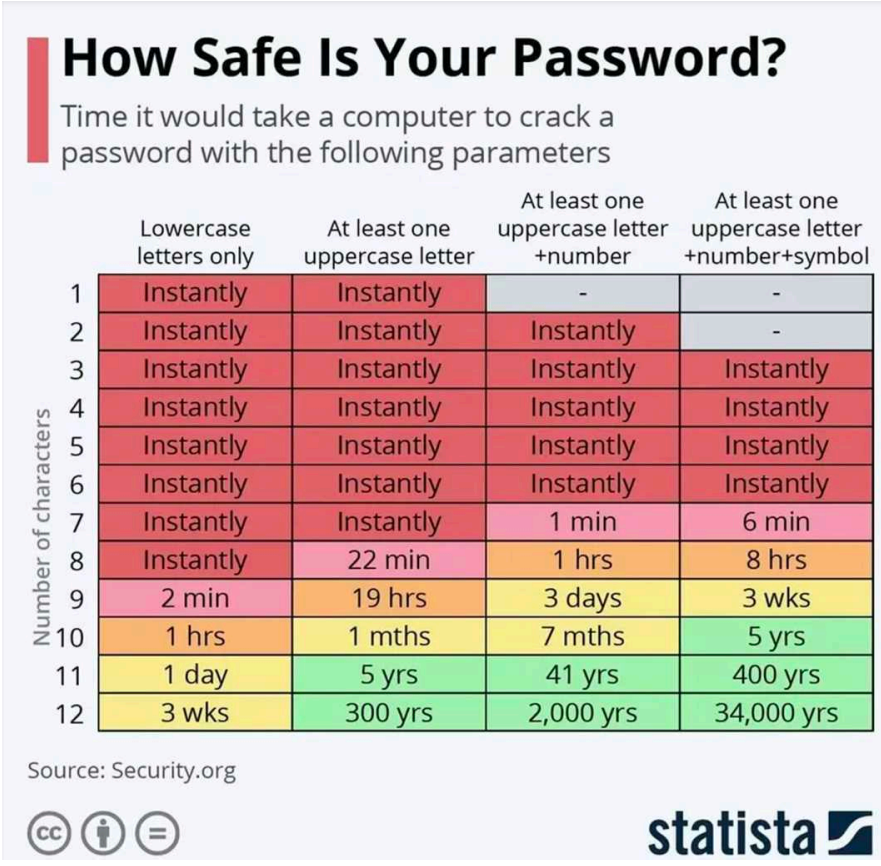
1. How should this table be read?
This table shows the time required for a computer to try all possible combinations of a password, depending on:
– the number of characters
– the type of characters included
– character diversity
Les quatre colonnes correspondent à des niveaux de complexité différents :
– Lowercase letters only
Lowercase letters only
only lowercase letters (ex : abcdef)
– At least one uppercase letter
lowercase letters + uppercase letters (ex : Abcdef)
– At least one uppercase + number
lowercase letters + uppercase letters + numbers (ex : Abc123)
– Uppercase + number + symbol
– lowercase letters + uppercase letters + numbers + symbols (ex : Abc123!@#)
– The more types of characters there are, the greater the number of combinations.
2. Analysis and interpretation of the table
Short passwords (1 to 7 characters)
No matter how complex they are, they are cracked instantly.
Machines test billions of combinations per second: a 7-character password is too short to resist.
From 8 characters: beginning of resistance
– 8 minuscules → Instantaneous
– 8 with capital letters → 22 minutes
– 8 with capital letters + numbers → 1 hour
– 8 complexes → 8 hours
An 8-character password is insufficient for most uses.
Between 9 and 10 characters: adequate strength
– 9 mixed characters → 3 days
– 10 complex characters → several months to several years
– This is where passwords start to become difficult to crack.
11–12 characters: strong security
– 11 complex characters → 400 years
– 12 complex characters → 34,000 years
– Recommended for all important accounts (email, banking, social media).
3. Why length is the most important factor
Each additional character multiplies the number of possible combinations.
Simplified example:
– 6 characters → ≈ 300 million combinations
– 12 characters → hundreds of trillions
Even with fast algorithms, a long password lasts much longer.
4. How can you create a truly secure password?
Here are some simple best practices:
Use at least 12 characters
– This is now the minimum recommended standard.
Mix :
– lowercase letters
– uppercase letters
– numbers
– symbols
Avoid personal information
(first name, date of birth, city, etc.)
Use a passphrase
Examples :
– Blue-Tiger-Space-98!
– Sunset*robot*forest!42
Never reuse the same password
– If a website is hacked, all your accounts become vulnerable.
Use a password manager
– Such as Bitwarden, 1Password, or the one built into your browser.